Grants and scopes
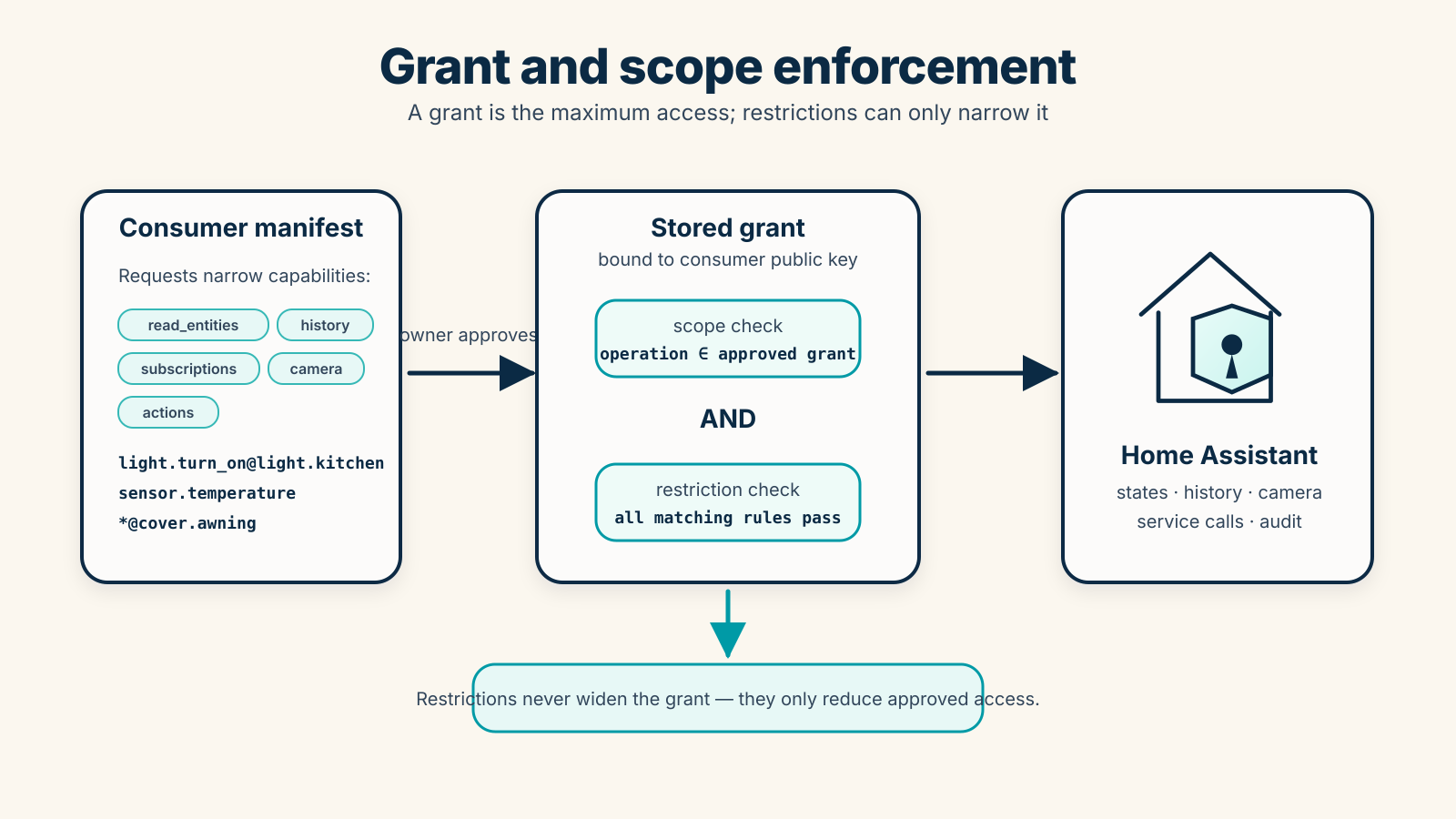
A consumer manifest describes the maximum access the consumer wants. If the owner approves it, Home Assistant stores a grant bound to the consumer public key.
The grant is enforced by the Authority on every data-plane message.
Manifest capabilities
Section titled “Manifest capabilities”A manifest may request:
read_entities: entity state snapshots. Read-scoped entities can also be subscribed for live updates.subscriptions: live state updates for entities not already inread_entities. The Authority computes subscribe access as the union ofsubscriptionsandread_entities, so listing the same entity in both is redundant.history: recorder history queries.camera_snapshots: camera snapshot retrieval.actions: Home Assistant service calls.
Entity scopes
Section titled “Entity scopes”Entity scopes support exact entities, domain wildcards, and *:
sensor.temperaturesensor.**Use narrow scopes whenever possible.
Action scopes
Section titled “Action scopes”Action scopes use one of these forms:
light.turn_on@light.kitchenlight.*light.*@light.kitchen*@cover.awningMeaning:
light.turn_on@light.kitchen: allow only one service on one entity.light.*: allow any service in thelightdomain, but only when the targeted entities also belong to thelightdomain, or when the call has no entity target. An entity-less call may affect every entity in the domain, depending on the service.light.*@light.kitchen: allow any service in thelightdomain, but only when it targets that one entity.*@cover.awning: allow any service targeting one entity, including services from other domains.
Service calls may also target area_id, device_id, or label_id. The Authority resolves those targets to entity IDs through the Home Assistant area, device, entity, and label registries, then checks every resolved entity against the action scopes. The call is denied if any resolved entity is not authorized, or if a target cannot be resolved (unknown ID, registries unavailable). When all resolved entities pass, the original target is forwarded unchanged so Home Assistant performs its own resolution.
Runtime subscriptions
Section titled “Runtime subscriptions”A grant defines the maximum allowed scope. A runtime subscription defines the current subset of entities the consumer wants to observe.
- Consumer sends
subscribe_stateswith entity IDs. - Authority validates every entity against the union of the grant’s
subscriptionsandread_entitiesscopes. - Authority stores a runtime subscription for that session.
- Authority returns an initial
state_snapshotwith the full current states. - Home Assistant state changes produce
state_deltaevents for matching subscriptions; each delta carries only the changed entities and thesubscription_id. - Consumer sends
unsubscribe_statesto remove the runtime subscription.
Owner-managed grant restrictions
Section titled “Owner-managed grant restrictions”A grant is the maximum permission boundary approved by the Home Assistant owner. The owner can add mutable restrictions to an approved grant to narrow that access without issuing a Home Assistant token to the consumer and without trusting the relay.
Effective access is:
stored grant scope allows the operationANDall enabled matching restrictions allow the operationRestrictions are enforced by the Home Assistant Authority on every data-plane request. They never widen a manifest scope, and the bridge/consumer are not trusted to enforce them.
Owners manage restrictions in the Varco panel from each grant card. The panel can add restrictions, toggle them enabled or disabled, edit their parameters in place, and remove them. All changes are persisted through varco/update_grant_restrictions and remain a narrowing layer on top of the stored grant.
When an owner changes a grant’s restrictions, the Authority clears active subscriptions for that grant and sends the consumer a grant_restrictions_updated error event. The consumer must create new subscriptions under the updated restrictions. Non-subscription requests continue on the same authenticated session, but are checked against the updated restrictions on the next request.
A restriction has this generic shape:
{ "id": "front-door-pin", "enabled": true, "type": "pin", "applies_to": "lock.unlock@lock.front_door", "params": { "pin_hash": "pbkdf2_sha256$..." }}applies_to may be grant, read, subscriptions, history, camera, actions, or an action selector such as light.turn_on@light.kitchen, light.*, or *@cover.awning.
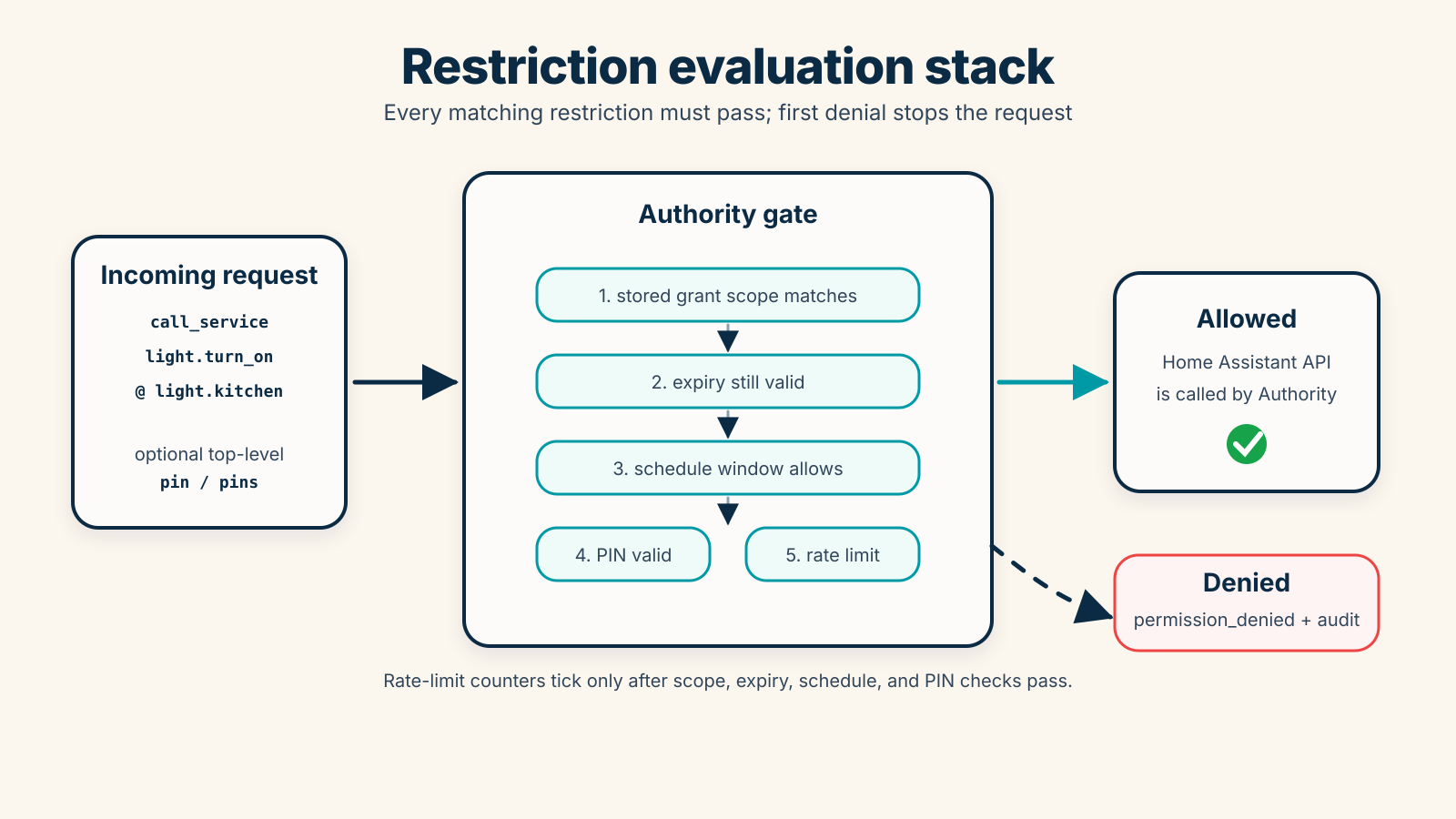
Restrictions are evaluated in declaration order. The first matching restriction that denies the operation stops evaluation immediately (fail-fast). Rate-limit counters are a second pass: they are only incremented when all stateless checks (expiry, schedule, PIN) have passed.
Implemented restriction types:
expiry: deny afterparams.expires_at, an ISO timestamp. The type aliasexpires_atis also accepted, as is placingexpires_atdirectly on the restriction root rather than insideparams.schedule: allow only on configureddays(lowercase three-letter abbreviations:mon–sun),start_time, andend_time(bothHH:MM).pin: require a matching request PIN. PINs are stored hashed with pbkdf2_sha256; owners can change or remove them but not retrieve the plaintext.rate_limit: limit matching operations withlimitandwindow_seconds. An optionalcooldown_secondsenforces a minimum gap between consecutive operations.template(advanced): allow only whenparams.value_template, a Home Assistant Jinja2 template, renders truthy (true,1,yes,on). The template is evaluated only inside the Home Assistant Authority viahomeassistant.helpers.template; the consumer and bridge never see it. A missing template, a render error, or a falsy result denies the operation (fail closed), audited astemplate_not_configured,template_error, ortemplate_deniedwithout the template result.
Example template restriction that allows unlocking the front door only while the alarm is disarmed:
{ "id": "alarm-disarmed", "enabled": true, "type": "template", "applies_to": "lock.unlock@lock.front_door", "params": { "value_template": "{{ is_state('alarm_control_panel.home_alarm', 'disarmed') }}" }}For service calls protected by a PIN, the consumer sends either a top-level pin for the matching restriction or a pins object keyed by restriction id:
{ "type": "call_service", "domain": "lock", "service": "unlock", "target": { "entity_id": "lock.front_door" }, "pins": { "front-door-pin": "1234" }}Denied restrictions are audited as restriction_denied with the restriction id and reason, without logging entity state, camera data, history payloads, or sensitive service data.