What is Varco?
Varco lets external apps use Home Assistant without receiving a Home Assistant token and without requiring Home Assistant to be publicly reachable.
A consumer asks for a narrow grant. The Home Assistant owner approves or rejects it in the Varco panel. After approval, every read, subscription, history query, camera snapshot, or service call is checked against that stored grant by Home Assistant itself.
Why Varco exists
Section titled “Why Varco exists”Home Assistant integrations inside the frontend already have an authenticated hass object. External dashboards, AI agents, companion apps, and hosted tools usually do not.
Varco separates access from credentials:
- Consumers never receive a Home Assistant long-lived access token.
- Home Assistant does not need a public inbound URL for normal Varco traffic.
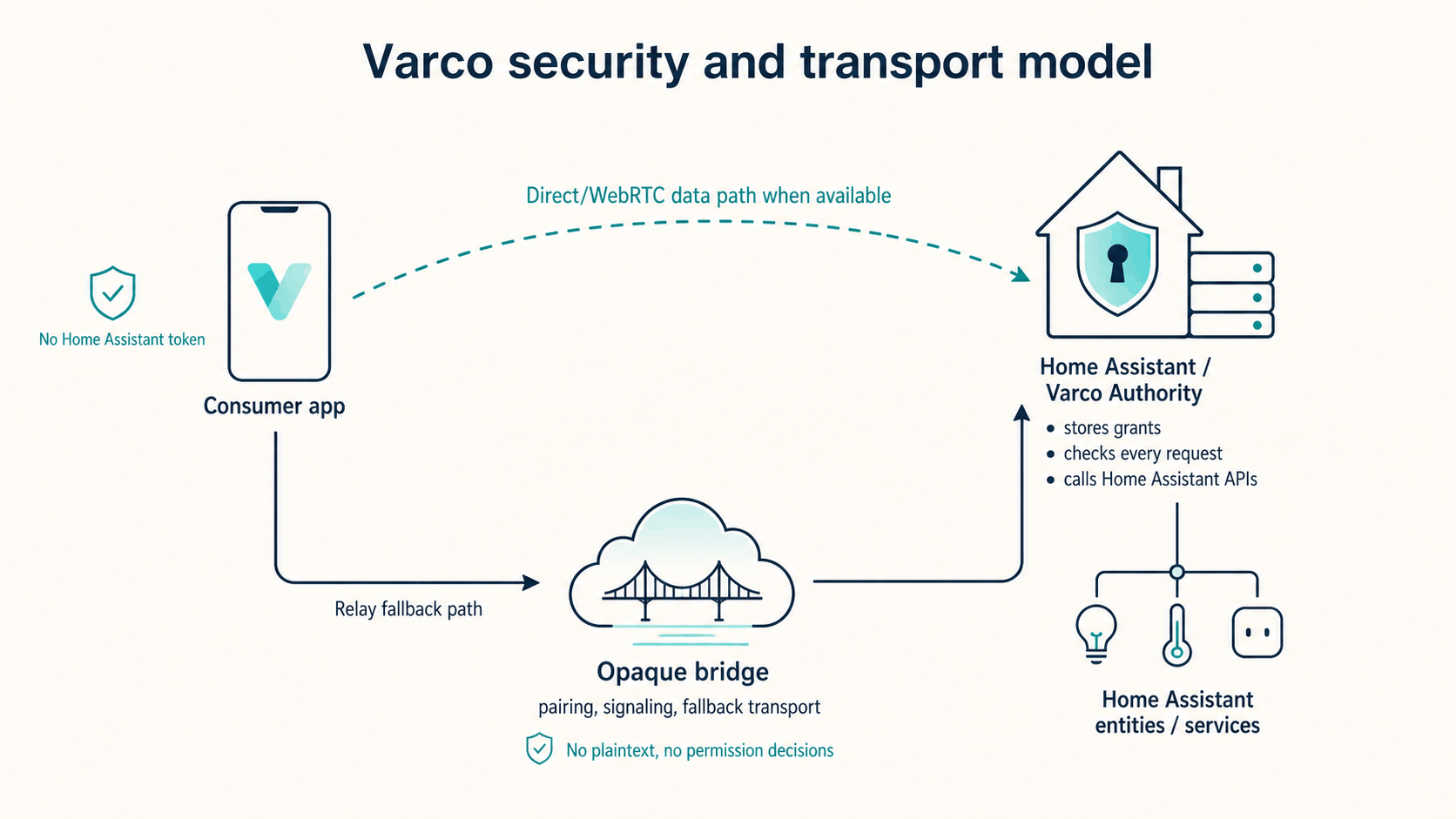
- The bridge carries encrypted envelopes and does not make permission decisions.
- Home Assistant remains the Authority for consent, grants, policy checks, service calls, and audit.
Common uses
Section titled “Common uses”- External dashboards for rooms, energy, or public status displays.
- Read-only showcase dashboards without direct Home Assistant access.
- Internal Home Assistant dashboard experiences using the existing
hassobject. - AI-assisted tools that need scoped entity state or service access.
- Agent-built companion apps with pairing, signaling, and relay fallback.
How it works
Section titled “How it works”- Home Assistant runs the Varco Authority integration and opens an outbound WebSocket to the bridge.
- A consumer connects to the bridge with the Authority ID and submits an access request manifest.
- The owner approves or rejects the request in Home Assistant.
- If approved, Home Assistant stores a grant bound to the consumer public key.
- The consumer connects using direct/WebRTC when possible, or the relay path for pairing, signaling, and fallback.
- The Authority enforces the stored grant on every data-plane message, regardless of transport.
- The owner can revoke or delete the grant from Home Assistant.
Start here
Section titled “Start here”- If you own a Home Assistant instance, start with Home Assistant quickstart.
- If you are building a browser consumer, start with Consumer quickstart.
- If you are running a Node backend or webhook, start with Server Consumer quickstart.
- If you want the protocol model, read Architecture and Trust model.